
Most people hear “mobile-first” and picture a developer adjusting CSS breakpoints. That’s understandable, but it misses the point entirely. What does mobile-first mean in practice? It’s a fundamental design philosophy that shapes how you prioritize content, structure navigation, and make decisions about user experience before a single line of code is written. For digital marketers, web developers, and entrepreneurs, getting this right has direct consequences for search rankings, conversion rates, and how users perceive your brand from the moment they land on your site.
Table of Contents
- Key Takeaways
- What does mobile-first mean, exactly?
- Where mobile-first came from
- How to implement mobile-first effectively
- Mobile-first design and SEO
- Common misconceptions about mobile-first
- My take on why mobile-first changes everything
- Build a site that performs on every screen
- FAQ
Key Takeaways
| Point | Details |
|---|---|
| Mobile-first is a design philosophy | It defines the order of design decisions, not just how a site looks on small screens. |
| It differs from responsive design | Responsive design adapts layouts; mobile-first sets mobile as the starting baseline. |
| Google indexes mobile content first | Your mobile experience directly determines how Google ranks your site in search results. |
| Constraints drive better design | Designing for small screens forces clarity and content prioritization that benefits all users. |
| Testing on real devices matters | Simulating actual mobile usage, including thumb reach and tap targets, reveals issues no desktop preview can catch. |
What does mobile-first mean, exactly?
The clearest way to understand the mobile-first approach definition is this: you design for the smallest screen first, then progressively add complexity and layout enhancements as the screen size grows. IxDF describes it as designing “for the smallest device first” then progressively enhancing layouts for larger screens. That’s the opposite of how most teams have historically worked.
Traditional desktop-first design starts with a full-featured, visually rich desktop layout and then strips things back for mobile. This is called graceful degradation. Mobile-first flips that. You build a lean, focused mobile experience and then layer in additional features and layout complexity for tablets and desktops. This is progressive enhancement.
The distinction matters because the two approaches produce very different results. Desktop-first often results in mobile experiences that feel like afterthoughts. Navigation is crammed, images are scaled awkwardly, and secondary content clutters the page because it was never truly deprioritized. Mobile-first forces you to make hard decisions about what actually belongs on the page.

From a technical standpoint, mobile-first differs from responsive design in a specific way. Responsive design is a technical capability. It means a site adapts to different screen sizes. Mobile-first is a strategic design order. A site can be responsive without being mobile-first. In code, mobile-first means your base CSS styles target mobile screens, and you use “min-width` media queries to apply tablet and desktop styles on top.
Here’s what mobile-first design prioritizes at the structural level:
- Content hierarchy: Only the most critical information appears at the top of the mobile layout.
- Navigation simplicity: Menus are touch-friendly, minimal, and accessible without hover states.
- Information architecture: The mobile layout becomes the baseline structure, not a reduced version of the desktop.
- Performance: Smaller screens get leaner assets, faster load times, and no unnecessary scripts.
Pro Tip: When reviewing a design mockup, cover the desktop version and ask: “Does this mobile layout stand on its own?” If it feels incomplete or confusing without the desktop version for context, the design process likely started in the wrong place.
Where mobile-first came from
The mobile-first approach was popularized in 2009 by Luke Wroblewski, then Google’s Product Director, and later formalized in his book Mobile First. At the time, it was a provocative idea. Desktop dominated web traffic, and designing for a 320px screen felt like designing for a niche audience.
What Wroblewski recognized early was that mobile constraints were not a problem to solve. They were a design filter. Forcing yourself to fit content onto a small screen with limited interaction patterns makes you cut everything that isn’t genuinely useful.
“Designing for mobile first is not a limitation. It’s a discipline that makes every design decision more deliberate.”
The industry caught up slowly. Then mobile traffic overtook desktop globally, and the conversation shifted from “should we do this?” to “why haven’t we done this already?” Google accelerated the urgency in 2018 when it officially rolled out mobile-first indexing, meaning Google’s crawlers now use the mobile version of a site as the primary version for ranking purposes. That single policy change made mobile-first design a direct SEO factor, not just a UX preference.
Today, mobile-first is considered essential for any digital product competing for visibility and user attention. It’s the baseline expectation, not a differentiator.
How to implement mobile-first effectively
Knowing the philosophy is one thing. Applying it consistently across a real project is another. Here are the core practices that separate effective mobile-first implementations from surface-level attempts.
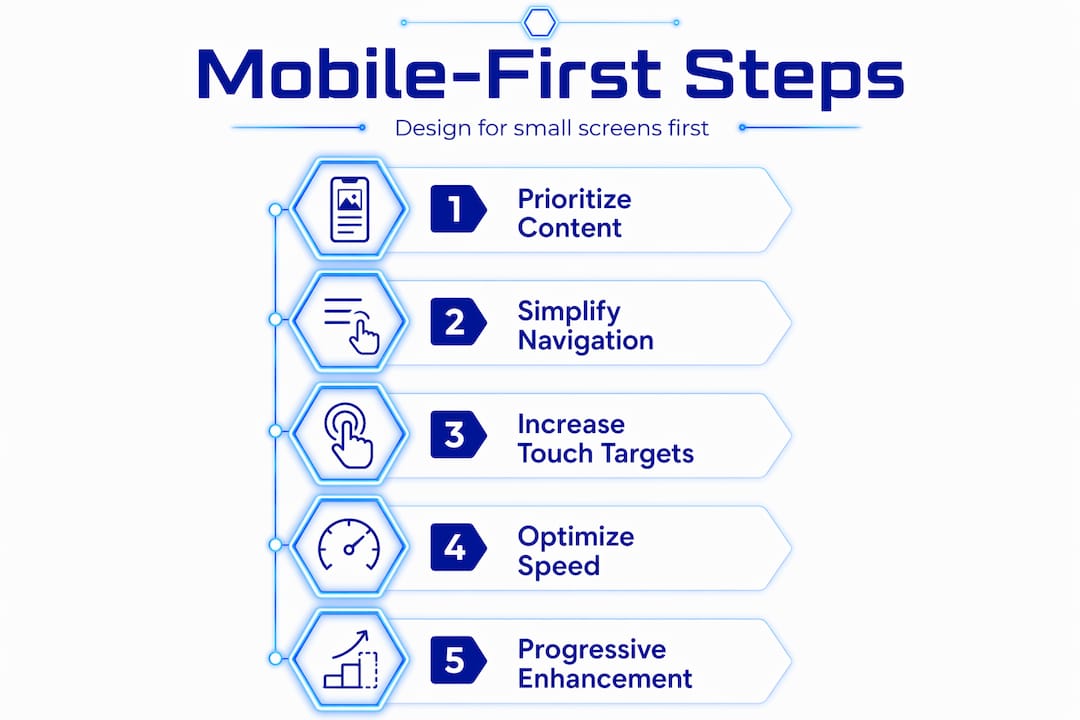
Start with content, not layout. Before opening a design tool, list the primary tasks your users need to complete on mobile. Every layout decision should serve those tasks directly.
Apply progressive disclosure. Show users only what they need at each stage of their journey. Secondary information, expanded details, and optional features can appear on larger screens or behind deliberate interactions.
Design for thumb reach. Effective mobile-first testing includes holding the phone in one hand and checking whether primary actions are reachable with a thumb. Tap targets should be at least 44×44 pixels to prevent mis-taps.
Set mobile as your CSS baseline. Write base styles for mobile first, then use
min-widthmedia queries to add tablet and desktop styles progressively. This approach reduces code bloat and makes performance optimization more natural.Prioritize Core Web Vitals. Google’s Core Web Vitals measure load speed, interactivity, and visual stability. Mobile-first design, when done properly, naturally improves these scores because you’re starting with a leaner, faster baseline.
Test on real devices, not just browser previews. Browser developer tools simulate screen sizes but don’t replicate actual mobile behavior. Test on physical devices across different connection speeds.
| Practice | What it addresses | Business impact |
|---|---|---|
| Content prioritization | Reduces cognitive load | Higher engagement and lower bounce rates |
| Touch-optimized navigation | Improves usability on small screens | More completed user journeys |
| Progressive enhancement | Ensures mobile baseline stability | Fewer UX inconsistencies across devices |
| Core Web Vitals optimization | Improves page speed and stability | Better search rankings and user retention |
Pro Tip: Run your site through Google’s PageSpeed Insights on mobile mode before desktop. The mobile score is what Google weights most heavily in its ranking signals. If the gap between your mobile and desktop scores is large, that’s where to focus your development effort.
Mobile-first design and SEO
The connection between mobile-first design and SEO is direct, not theoretical. Google’s mobile-first indexing means the search engine primarily uses your site’s mobile version to determine rankings. If your mobile experience is slow, disorganized, or missing content that appears on desktop, your rankings reflect that.
Mobile-first design improves engagement and SEO rankings through several mechanisms that work together:
- Faster load times: Mobile-first sites are built lean from the start. Fewer render-blocking resources and smaller image payloads translate directly to faster pages, which Google rewards.
- Lower bounce rates: When mobile users land on a page that loads quickly and presents information clearly, they stay longer. Bounce rate is a behavioral signal that influences ranking.
- Improved conversion rates: Simplified, focused UX removes friction. A mobile user who can find what they need in two taps converts at a higher rate than one navigating a cluttered page.
- Omnichannel consistency: A mobile-first approach creates a stable content baseline that scales up cleanly to desktop and other devices. This consistency matters for brand trust and campaign performance.
For digital marketers specifically, mobile-first design affects campaign ROI. If you’re driving paid traffic to a landing page that performs poorly on mobile, you’re paying for clicks that don’t convert. Aligning your ad creative and landing page experience with a mobile-first UX is not optional if you want accurate attribution and strong return on ad spend.
Common misconceptions about mobile-first
Even teams that understand the concept in theory often stumble in practice. A few misconceptions come up repeatedly.
- “Mobile-first just means having a separate mobile site.” It doesn’t. Mobile-first is a design mindset that starts with mobile as the baseline experience. Separate mobile sites create duplicate content risks and fragmented UX. One site, built mobile-first, is the correct approach.
- “It limits what we can do on desktop.” The opposite is true. Because you’re using progressive enhancement, desktop gets everything mobile has plus additional features and layout complexity where appropriate.
- “Our audience uses desktop, so mobile-first doesn’t apply.” Google indexes the mobile version of your site regardless of your audience’s device preferences. Mobile-first indexing is not optional.
- “It’s a one-time build decision.” Mobile-first requires ongoing testing and iteration. User behavior, device capabilities, and Google’s performance benchmarks all change. Your mobile experience should be reviewed regularly.
The separation between mobile and desktop experiences is one of the most common and costly mistakes in web design. When teams treat mobile as a secondary deliverable, the result is always a fragmented user experience that hurts both engagement and SEO.
My take on why mobile-first design changes everything
I’ve worked on enough digital projects to say this with confidence: the teams that resist mobile-first thinking are almost always the ones carrying the most technical debt. They built a beautiful desktop site, tacked on a mobile version later, and now they’re managing two separate experiences that drift further apart with every update.
What I’ve found is that starting with mobile doesn’t limit creativity. It focuses it. When you have limited space and no hover states to rely on, you make better decisions about what actually belongs on a page. Prioritization under constraint produces cleaner interfaces that serve every user better, not just mobile users.
The mindset shift is the hard part. Most designers and developers learned their craft on desktop-sized canvases. Switching that default takes deliberate practice. But once you’ve built a few projects mobile-first from the start, going back feels like designing with one hand tied behind your back.
Looking at where web technology is heading, with progressive web apps, voice interfaces, and wearable devices, the mobile-first philosophy becomes even more relevant. The discipline of designing for the most constrained environment first is exactly the skill set that translates to emerging platforms. Teams that have internalized mobile-first thinking now are building the habits that will matter most in the next five years.
Build a site that performs on every screen
If you’ve read this far, you understand that mobile-first design is not a checkbox. It’s a commitment to building your web presence around the way your audience actually uses the internet. Getting it right requires the right process from day one, not a retrofit after the fact.

At Vanblaisa, every website we build for small businesses across Tasmania and Australia starts as a mobile-first design. That means your site is fast, structured for search, and built to convert visitors into real enquiries, whether they find you on a phone at 7am or a desktop at lunch. We don’t build “nice websites.” We build online assets that work. If you’re ready to stop leaving mobile traffic on the table, let’s talk about what a performance-first website can do for your business.
FAQ
What does mobile-first design mean in web design?
Mobile-first design means designing a website starting with the smallest screen size and progressively adding features and layout complexity for larger screens. It’s a design philosophy, not just a technical setting.
How is mobile-first different from responsive design?
Responsive design is a technical capability that allows a site to adapt to different screen sizes. Mobile-first is the strategic order in which design decisions are made, with mobile as the starting baseline.
Why does mobile-first design matter for SEO?
Google uses mobile-first indexing, meaning it primarily crawls and ranks the mobile version of your site. A poor mobile experience directly affects your search rankings, regardless of how your desktop site performs.
Does mobile-first design limit desktop functionality?
No. Mobile-first design uses progressive enhancement, meaning desktop layouts build on top of the mobile baseline and can include additional features, expanded navigation, and richer visual layouts.
How do I know if my site is truly mobile-first?
Check your CSS structure for mobile base styles with min-width media queries, test your site on a physical device with one hand, and run Google’s PageSpeed Insights on mobile mode. If your mobile score is significantly lower than desktop, your site was likely built desktop-first.
Common Questions
Most people hear "mobile-first" and picture a developer adjusting CSS breakpoints. That"s understandable, but it misses the point entirely.
Look for a clear process, relevant experience, realistic expectations and a next step that matches your business goals.
The next step is to review your current situation, confirm the goal, and speak with the team about the most practical way forward.