
Quick summary on mobile-first design for businesses
Mobile-first website design starts with the mobile experience and builds outward, prioritizing speed, clear content, simple navigation, and easy-to-tap actions. The post compares mobile-first, responsive, and adaptive design, and explains how mobile-first can improve usability, SEO, and conversions.
It also outlines a step-by-step process, best practices, common breakpoints, and mistakes to avoid. Real business examples show how a mobile-first structure, paired with SEO and conversion planning, can support better search visibility and more enquiries.
What is mobile-first website design and why does it matter for businesses?
Mobile-first website design starts with mobile devices, focusing on simple, fast, and user-friendly experiences. By prioritizing mobile needs, your site loads quickly and is easy to use, even on slower connections.
As your site adapts to larger screens, it stays clear and fast, avoiding clutter. This approach boosts user satisfaction, improves search rankings, and keeps visitors engaged.
Mobile-first design vs. responsive design: What’s the difference?
Mobile-first design is an approach where websites are initially created for mobile devices, making sure essential information and key actions are easily accessible on smaller screens. This means the most important content, navigation, and calls-to-action are prioritized for users on smartphones.
Designers start with mobile, then add features for tablets and desktops to ensure smooth scaling. Responsive Web design lets your site automatically adapt to any device, so every visitor gets a consistent, seamless experience.
Mobile-First vs Responsive vs Adaptive Design – What’s the difference?
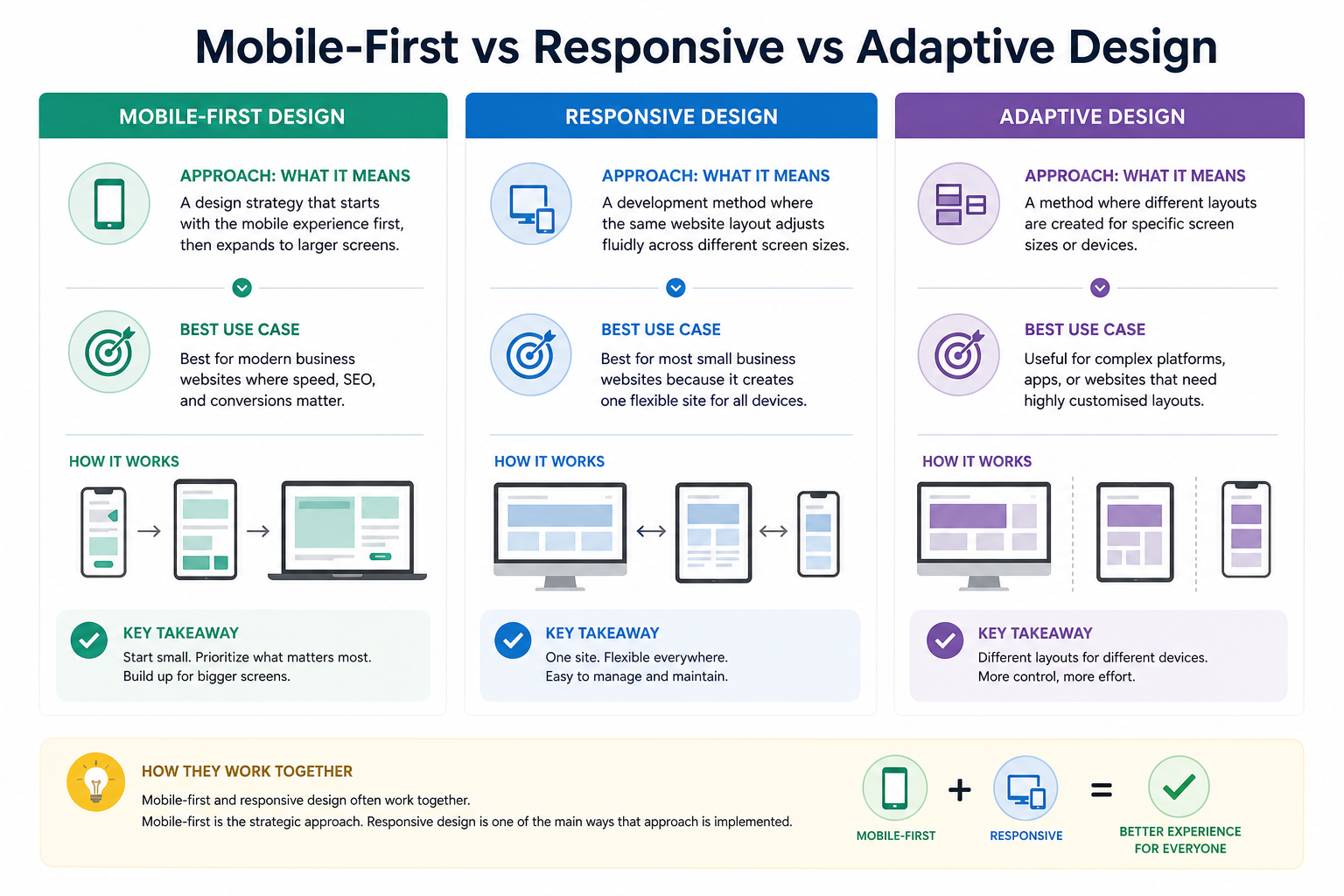
Approach: What It Means – Best Use CaseMobile-first designA design strategy that starts with the mobile experience first, then expands to larger screens. Best for modern business websites where speed, SEO, and conversions matter.
Responsive design: A development method where the same website layout adjusts fluidly across different screen sizes.Best for most small business websites because it creates one flexible site for all devices.
Adaptive design: A method where different layouts are created for specific screen sizes or devices.Useful for complex platforms, apps, or websites that need highly customised layouts.
Mobile-first and responsive design often work together. Mobile-first is the strategic approach. Responsive design is one of the main ways that approach is implemented.
Core principles of the mobile-first design process
Begin by focusing your design on smartphones and tablets, using a mobile-first approach. Make sure the most important features and content are easy to access on small screens—like simple navigation, quick load times, and clear, readable text.
Once you’ve covered these essentials, build on your design for larger screens by adding extra features and visual details. This step-by-step method keeps your website user-friendly, fast, and effective across all devices.
Content inventory and prioritization
Prioritise the key content and features your users need on mobile. Clarity, usefulness, and speed should always come first.
Start by reviewing your content to identify what’s essential, then organise it around your users’ main goals and a clear user flow. This helps deliver a seamless and valuable experience from the very first tap.
Design for small screens first
Focus on mobile first by choosing responsive layouts and clear fonts for easy reading on any device. Design for fast loading and simple touch navigation on smartphones, then adapt for tablets and desktops to ensure a seamless user experience.
Simplified navigation
Make your website easy for mobile users by using clear visual hierarchy and familiar navigation tools like hamburger menus or bottom bars. Use large, easy-to-tap buttons and simple labels. This keeps visitors engaged and more likely to take action.
Mobile Navigation Patterns That Work
Mobile navigation needs to be simple because users are working with limited screen space and often using one hand.
Common mobile navigation patterns include:
Pattern Best For
Hamburger menu Sites with several service pages or deeper navigation.
Sticky call button Service businesses where phone enquiries are important.
Bottom nav bar Apps, booking platforms, or websites with a few high-value actions.
Collapsible sections Long service pages, FAQs, and educational content.
Sticky CTA bar Lead generation websites where quote requests, bookings, or calls are the main goal.
For most small business websites, the goal is not to show every option at once. The goal is to make the next step obvious.
How to Design a Website Mobile-First, Step by Step
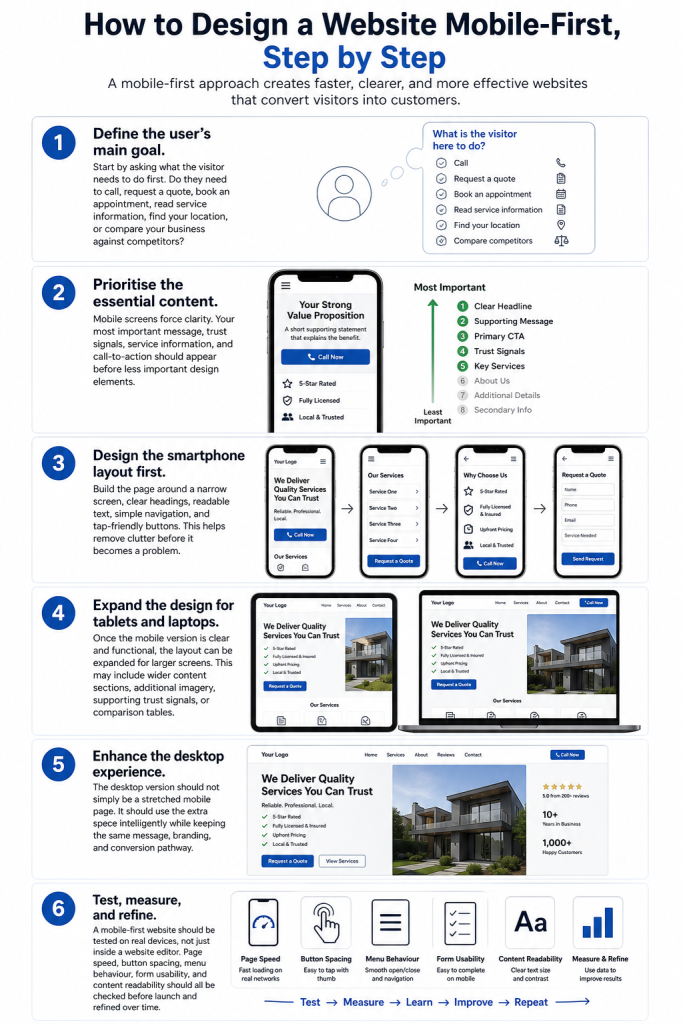
Mobile-first website design works best when it follows a clear process. Instead of designing a large desktop layout first and then trying to squeeze everything into a smaller screen, the mobile-first process starts with the most important content and actions.
Step 1: Define the user’s main goal.
Start by asking what the visitor needs to do first. Do they need to call, request a quote, book an appointment, read service information, find your location, or compare your business against competitors?
Step 2: Prioritise the essential content.
Mobile screens force clarity. Your most important message, trust signals, service information, and call-to-action should appear before less important design elements.
Step 3: Design the smartphone layout first.
Build the page around a narrow screen, clear headings, readable text, simple navigation, and tap-friendly buttons. This helps remove clutter before it becomes a problem.
Step 4: Expand the design for tablets and laptops.
Once the mobile version is clear and functional, the layout can be expanded for larger screens. This may include wider content sections, additional imagery, supporting trust signals, comparison tables, or stronger visual storytelling.
Step 5: Enhance the desktop experience.
The desktop version should not simply be a stretched mobile page. It should use the extra space intelligently while keeping the same message, branding, and conversion pathway.
Step 6: Test, measure, and refine.
A mobile-first website should be tested on real devices, not just inside a website editor. Page speed, button spacing, menu behaviour, form usability, and content readability should all be checked before launch and refined over time.
8 mobile-first design best practice tips.
1. Prioritise content.
Start with quality content—it’s key to your platform’s success. Great content attracts customers and builds your credibility on Google.
2. Keep your user in mind.
User experience is central to mobile-first websites. Focus on how users interact with their phones and make scrolling and tapping easy.
3. Consider accessibility.
Ensure your content is accessible and highlights key information. Accessibility and mobile-first design make your content easy for everyone to use. Accessibility also has a direct business benefit. When text is easy to read, buttons are easy to tap, colours have enough contrast, and forms are simple to complete, more people can use the website confidently. For small businesses, that means fewer frustrated visitors, stronger trust, and more opportunities for enquiries.
4. Optimise content for Search Engine Optimisation (SEO).
Optimise your content with relevant keywords and meta descriptions to boost your search rankings and visibility on Google who now primarily uses the mobile version of websites for ranking.
5. Use mobile-optimised layouts.
Create attractive, functional mobile layouts that adapt smoothly to any screen size and work consistently across all devices.
6. Intuitive navigation.
Ensure your page is easy to use on mobile. Use clear navigation or an interactive site map to guide visitors through their customer journey.
7. Avoid disruptive pop ups.
Mobile devices have limited space, so avoid unnecessary pop-ups that clutter the site and harm user experience.
8. Test your website.
Test your website on mobile before launch to catch issues and ensure a great user experience on all devices. The key here is to repeatedly test and tweak to ensure every actionable detail (color contrast, alt text, readable fonts, screen reader, buttons compatibility and intuitive gestures all fit seemlessly creating the perfect user experience.
What a Good Mobile-First Homepage Looks Like
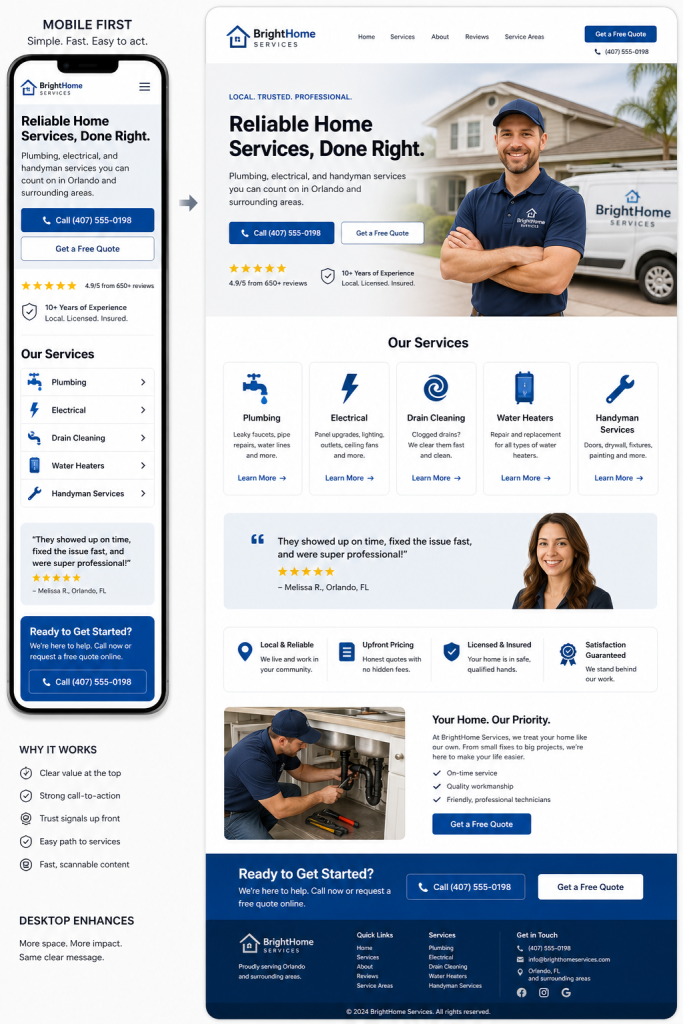
A strong mobile-first homepage should feel simple, fast, and easy to act on. At the top of the page, visitors should quickly understand who you are, what you offer, where you operate, and what step to take next.
For a local service business, this usually means a clear headline, a short supporting message, a visible call-to-action, trust signals such as reviews or years of experience, and a simple path to the main services. On mobile, these elements should stack naturally so the visitor can scroll, scan, and take action without feeling overwhelmed.
As the design expands to desktop, the same message can become more visually impressive. The layout may include stronger imagery, side-by-side sections, service cards, testimonials, and additional supporting content. The key is that the desktop version should enhance the mobile experience, not replace it.
What Happens When You Apply Mobile-First Design Principles?
Example 1: Awkar & Co Family Lawyers
Awkar & Co Family Lawyers came to VanBlaisa with a website that had been created using an AI website builder. While the site existed online, it was poorly structured, difficult to use on mobile devices, weak from a conversion perspective, and not performing properly in search results.
VanBlaisa rebuilt the website with a mobile-first structure, clearer service positioning, improved content, stronger calls-to-action, and a better user journey for potential family law clients.
Within the first month, the website began ranking for local search terms and received its first conversion lead. This shows the practical value of combining mobile-first design with proper SEO structure and conversion planning.
Example 2: O’Dea Lawyers
O’Dea Lawyers had previously worked with other web design, SEO, and marketing providers without receiving meaningful enquiry results. VanBlaisa took a more strategic approach, focusing on mobile-first design, service page structure, content planning, ongoing SEO, and conversion optimisation.
After nearly two years of careful planning and continual improvement, O’Dea Lawyers now receives a regular flow of online enquiries. The firm has also expanded its physical presence with additional office locations.
The important lesson is simple: mobile-first design is not just about making a website fit on a phone. It is about creating a clear, credible, fast, and conversion-focused experience that supports business growth.
The Benefits of Mobile-First Design for Local Businesses
Mobile-first design is more than just a trend—it’s a smart way to create fast, streamlined, and user-friendly experiences on any device. By starting with mobile and then expanding to larger screens, you gain benefits such as:
- Consider accessibility. A mobile-first website should be easy for as many people as possible to use. That means readable font sizes, strong colour contrast, clear headings, descriptive alt text for images, and buttons that are large enough to tap without frustration. Accessibility also includes the way your website works for people using screen readers, keyboard navigation, or assistive technology. Good accessibility is not just a compliance issue. It improves clarity, usability, and trust for every visitor.
- Faster load times. Simpler layouts and smaller file sizes help your website load faster, especially on mobile devices. This ensures your site appears quickly for visitors on smartphones or tablets, even with slow internet connections.
- Better user experience. Limited space encourages simplicity—interfaces become cleaner, easier to navigate, and more intuitive. By highlighting only the essentials, users can quickly find what they need without distractions or clutter. This streamlined approach improves the overall user experience and helps visitors feel more confident and comfortable using your website or digital tool.
- Improved SEO rankings. Google ranks websites based on their mobile version, so a user-friendly mobile site helps improve your search ranking and makes it easier for customers to find you—especially as more people use phones to search for local services.
- Scalability. Start with a mobile-first design by building a simple, effective site for phones first. Once that’s set, it’s easy to add features for tablets and desktops. This saves time, speeds up your site, and gives every visitor a better experience, no matter their device.
- Streamlined development. Reducing early distractions results in cleaner code, faster development, and better teamwork. Staying focused from the start saves time, improves communication, and delivers a higher-quality product that meets your goals.
How VanBlaisa Can Help Your Business Go Mobile-First
VanBlaisa designs and builds premium websites for small businesses across Tasmania and Australia — mobile-first, SEO-ready, and conversion-led. The goal isn’t just a “nice website”; it’s a fast, credible online asset that turns visitors into enquiries.
We believe your website should do more than look good—it should be fast, reliable, and built to turn visitors into genuine business opportunities. With VanBlaisa, you gain a dedicated partner committed to helping your business grow online, offering ongoing support and practical advice at every stage.
Good tools can help create a mobile-friendly website, but the strategy behind the design still matters. A website builder or theme will not automatically create the right content order, conversion pathway, SEO structure, calls-to-action, or trust signals. VanBlaisa combines professional design tools with practical strategy, so your website is planned around how real customers search, compare, and enquire.
What to Watch Out for With Mobile-First Design
Mobile-first design is powerful, but it still needs to be handled properly. A common mistake is making the desktop version too simple because the design started on mobile. The larger-screen experience should still feel complete, professional, and visually strong.
Another risk is hiding too much content on mobile. If important service information, internal links, FAQs, reviews, or calls-to-action are missing from the mobile version, the website can lose both user trust and SEO value.
The best approach is balance. Start with clarity on mobile, then progressively enhance the design for larger screens without weakening the message, branding, or conversion pathway.
Common Website Breakpoints to Consider
Breakpoints are the screen widths where a website layout changes to better suit the device being used. While every site should be designed around its own content, these common breakpoints are a useful starting point:
Device TypeCommon Width RangeSmall smartphones320px to 480pxLarge smartphones481px to 767pxTablets768px to 1023pxLaptops1024px to 1199pxDesktops and large screens1200px and above
The best websites do not rely on breakpoints alone. They also consider how the content behaves. A section should change layout when the content starts to feel cramped, not only because it has reached a generic device size.
Mobile-first layouts are usually built from the smallest screen upward. The mobile version sets the foundation: content order, button placement, spacing, image size, menu behaviour, and form layout. Once that foundation works properly, the design is expanded for tablets and desktops with wider sections, extra visual detail, and more flexible layouts. This keeps the mobile experience clean while still allowing the desktop version to feel premium.
How Mobile-First Websites Are Built Behind the Scenes
A mobile-first website is usually built by starting with the simplest version of the page first. The mobile layout comes before the desktop layout, so the most important content, buttons, forms, images, and navigation are prioritised from the beginning.
From there, the design is expanded for larger screens. This is called progressive enhancement. It means the website starts lean and focused on mobile, then adds more space, stronger visuals, wider layouts, and extra design details for tablets and desktops.
Good mobile-first development also uses breakpoints. These are points where the layout changes to better suit the screen size. For example, a section that appears as one column on a phone may become two columns on a tablet and three columns on a desktop.
The best breakpoints are not chosen only by device size. They are chosen by watching how the content behaves. If headings feel cramped, buttons become awkward, images take over the screen, or service cards become hard to scan, the layout needs to adjust.
Mobile-first websites should also use flexible images and readable text. Images should load at the right size for the device, and headings should scale naturally between mobile and desktop. This helps keep the website fast, readable, and professional on every screen.
At VanBlaisa, this technical structure is handled during the design and build process, so business owners do not need to worry about the code. The goal is simple: a website that loads quickly, looks polished, works properly on mobile, and still feels premium on larger screens.
Frequently Asked Questions (FAQ)
Is mobile-first design still relevant?
Absolutely, mobile-first design remains a key strategy for web designers. With the majority of people now browsing and shopping on their phones, creating a smooth mobile experience is vital. In 2023, most online retail visits and purchases happened on smartphones rather than computers.
Why is mobile-first design important?
Starting with a mobile-first mindset naturally results in designs that prioritize content and the user experience. Mobile devices come with the greatest constraints, such as smaller screens and limited bandwidth. That means if your website works well on mobile, it will generally perform just as effectively on tablets or desktops too.
How does mobile-first design impact SEO?
Optimise your content to boost your rankings on search engines such as Google and Bing. Focus on using relevant keywords and crafting effective meta descriptions to build authority and increase your visibility in search engine results pages (SERPs).
If my website isn’t mobile-first, should I redesign it?
If your website feels awkward on mobile devices or you notice many visitors leaving quickly on their phones, it’s likely time for a redesign. Adopting a mobile-first approach ensures a smoother user experience and keeps your design up to date with changing user habits.
What are common breakpoints?
For responsive design, use these common device widths: 320–480px for smartphones, 768px for tablets, 1024px for laptops, and 1200px or more for desktops. Modern best practice is to set breakpoints based on your content, not just device size.
Is mobile-first design the same as mobile-friendly design?
No. A mobile-friendly website may simply adjust to fit a phone screen. A mobile-first website is planned from the beginning around the mobile user’s experience, content priorities, navigation, speed, and conversion pathway.
Can a mobile-first website still look premium on desktop?
Yes. Mobile-first does not mean desktop design is ignored. It means the essential structure is built properly first, then enhanced for larger screens with stronger visuals, additional layout flexibility, and more detailed brand presentation.
What are the biggest mobile-first design mistakes?
The most common mistakes include small text, weak contrast, buttons that are hard to tap, slow-loading images, cluttered menus, intrusive pop-ups, missing mobile content, and forms that are difficult to complete on a phone.
How does mobile-first design help local businesses?
Local customers often search from their phones when they are ready to call, book, compare, or visit. A mobile-first website helps them find key information quickly, builds trust faster, and makes it easier to take action.
Next Steps: Ready to Modernise Your Website?
Your website should do more than look good. It should load quickly, work properly on mobile devices, communicate your value clearly, and turn visitors into genuine enquiries.
VanBlaisa creates premium, mobile-first websites for small businesses across Tasmania and Australia. Every website is built with practical SEO structure, clear branding, strong user experience, and conversion-focused design.
Plenty of websites look acceptable at first glance. The difference is whether they are strategically built to help your business grow.
Book a consultation with VanBlaisa today and let’s build a website that gives your business a stronger, faster, and more effective online presence.